Teach the assistant
The assistant answers from your website and from the answers you add. When a visitor asks something your website does not say, the question waits for you in the Knowledge base tab.
Questions your website could not answer
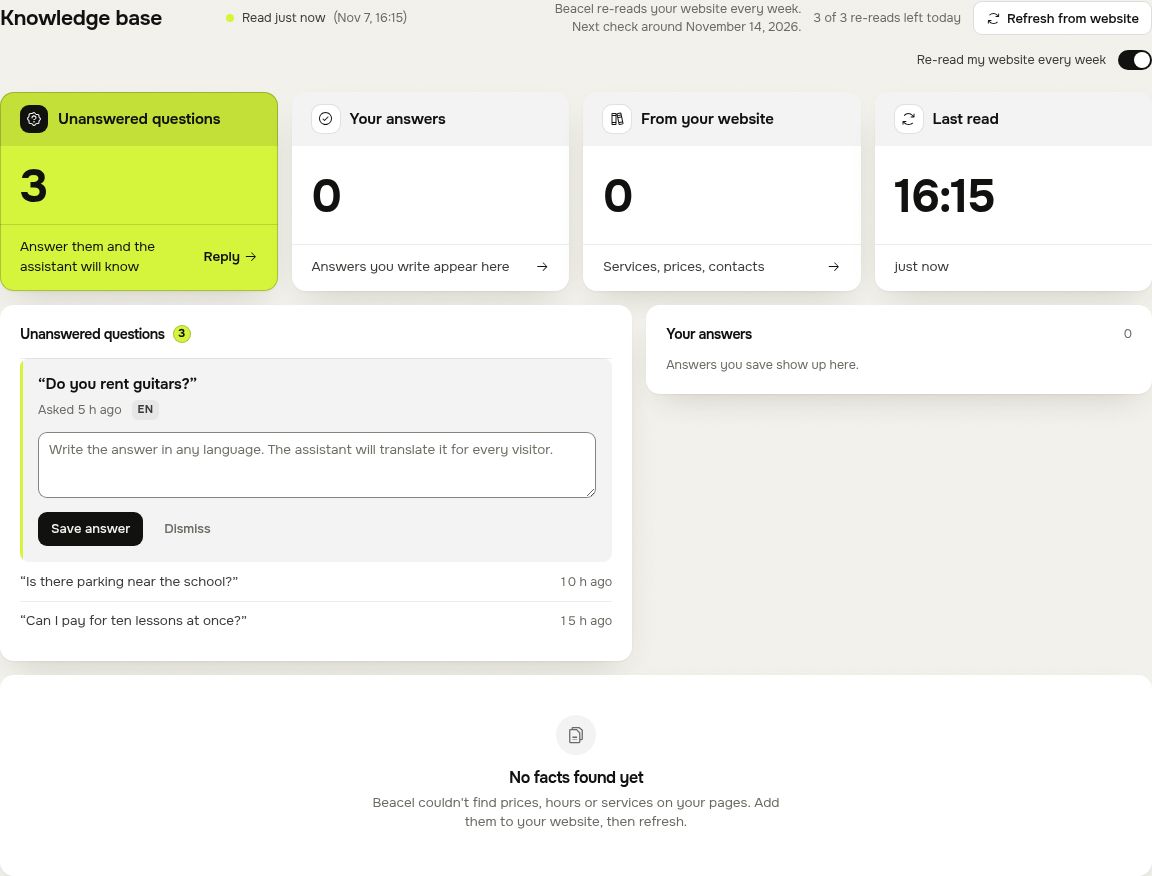
The assistant never makes up a price or a promise. When it does not know, it tells the visitor so and offers to pass the question on. The question then appears under Unanswered questions, with when it was asked and in which language.
Add the answer
- Open the question. A box for your answer opens under it.
- Write the answer in any language. The assistant translates it for every visitor.
- Press Save answer. From then on the assistant knows it, in every language.
A question that needs no answer (spam, or something you do not offer) can be dismissed with Dismiss. For a few seconds you can undo it.
Re-read your website
Changed your prices or opening hours? Press Refresh from website and Beacel reads your pages again. Answers you added stay. How often you can do this depends on your plan:
| Account | Re-reads |
|---|---|
| Free account | 1 a month |
| Free trial | 1 a day |
| Start | 1 a day |
| Pro | 3 a day |
| Agency | 3 a day |
A re-read that finds nothing changed on your website does not count. Between two re-reads of the same site there are at least 10 minutes. The tab shows how many re-reads are left.
The test chat on Overview has a daily limit too: 50 messages a day on a plan or a trial, 20 on a free account.
Weekly re-read
On Pro and Agency Beacel checks your website every week and takes in real changes by itself (up to 8 automatic updates a month), so a change on your site reaches the assistant without you doing anything. The switch Re-read my website every week, under the line that says when your site was last read, turns it off and on.
Questions
Write to hello@beacel.com.